How to File Taxes Online in Canada: A Step-by-Step Guide

Filing your taxes online in Canada is faster, more accurate, and more convenient than mailing a paper return. The Canada Revenue Agency (CRA) accepts electronic tax returns through a system called NETFILE, and most Canadians can file for free using certified tax software. Here is everything you need to know to file your return online this year.
Taxccount Canada helps individuals looking for tax filing near me understand the online tax filing process and CRA requirements.
Can You File Taxes Online in Canada?
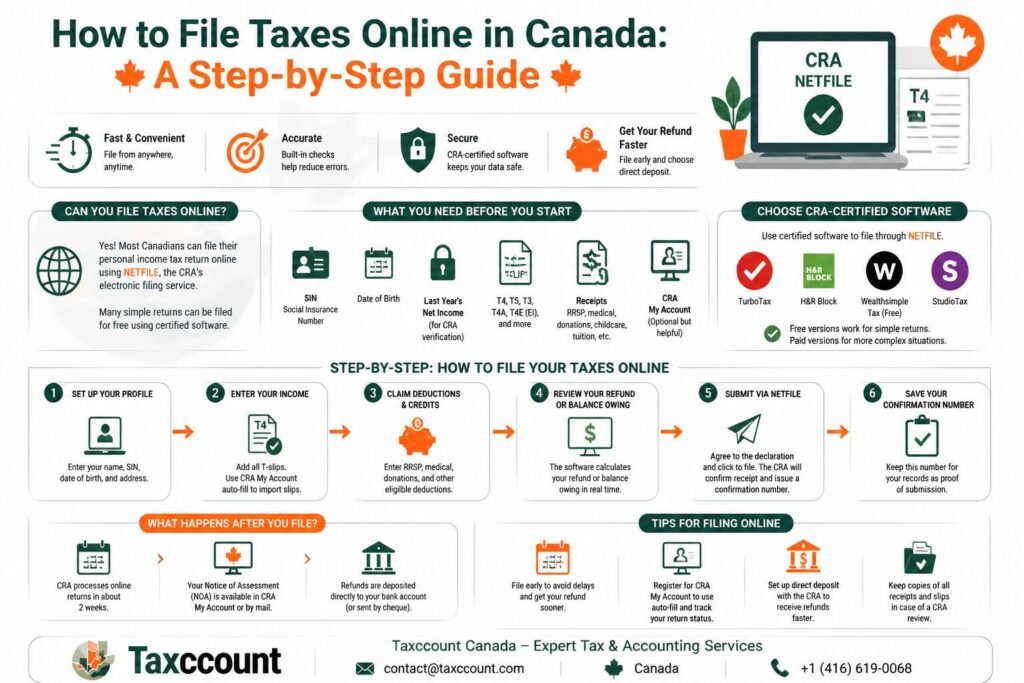
Yes. The CRA allows most Canadians to file their personal income tax returns online through NETFILE — the CRA’s electronic filing service that accepts tax returns submitted through certified tax software. Most simple returns can be filed for free.
Professional tax return filing services are available if you need assistance with more complex returns.
File Taxes Online
☎️ Get HelpWhat You Need Before You Start
Before filing online, gather the following:
- Your Social Insurance Number (SIN)
- Date of birth
- Net income from your last filed return (for CRA identity verification)
- T-slips: T4 (employment), T5 (investment), T3, T4A, T4E (EI)
- Receipts for deductions: RRSP contributions, medical expenses, donations, childcare, tuition
- CRA My Account login (optional but helpful for auto-fill)
An accountant for taxes can help ensure all required documents are included.
Choosing Online Tax Software
You must use CRA-certified software to file via NETFILE. Popular certified options include:
- TurboTax
- Wealthsimple Tax (free)
- H&R Block
- StudioTax
Free versions are usually sufficient for simple employment income situations. If you have self-employment income, rental income, or capital gains, you may need a paid version.
Professional tax and accounting services may be beneficial if your return includes multiple income sources.
Step-by-Step: How to File Your Taxes Online
Follow these steps to complete and submit your return through NETFILE.
Set Up Your Profile
Enter your name, SIN, date of birth, and address.
Enter Your Income
Add all T-slips. Use CRA My Account’s auto-fill feature to import slips automatically.
Claim Deductions and Credits
Enter RRSP contributions, medical expenses, donations, and any other eligible deductions.
Review Your Refund or Balance Owing
The software will calculate your refund or the amount you owe in real time.
Submit via NETFILE
Agree to the declaration and click to file. The CRA will confirm receipt with a confirmation number.
Save Your Confirmation Number
Keep this for your records as proof of submission.
A tax accountant near me can review your return before submission if you have questions.
What Happens After You File?
After submitting your return online:
- The CRA typically processes online returns within two weeks.
- Your Notice of Assessment (NOA) will be available through CRA My Account or by mail.
- Any refund will be deposited directly to your bank account (if registered for direct deposit) or sent by cheque.
Tax accountants can help you understand your Notice of Assessment after processing.
Tips for Filing Online
- File early to avoid delays and get your refund sooner.
- Register for CRA My Account to use auto-fill and track your return status.
- Set up direct deposit with the CRA to receive refunds faster.
- Keep copies of all receipts and slips in case of a CRA review.
Income tax preparation near me services can provide additional support if you are filing for the first time.
Table of Summary
Here is the blog information in 6 easy rows for quick understanding:
| Section | Easy Information |
|---|---|
| 1. Topic | The blog explains how to file taxes online in Canada using NETFILE. |
| 2. Eligibility | Most Canadians can file personal income tax returns online through CRA-certified software. Simple returns are usually free; complex returns may require professional help. |
| 3. What You Need | SIN, date of birth, last year’s net income, T-slips (T4, T5, T3, T4A, T4E), receipts for deductions, and optionally CRA My Account login for auto-fill. |
| 4. Choosing Software | Use CRA-certified software such as TurboTax, H&R Block, StudioTax, or Wealthsimple Tax. Free versions often suffice for simple returns. |
| 5. Step-by-Step Filing | 1) Set up profile, 2) Enter income (auto-fill optional), 3) Claim deductions/credits, 4) Review refund/balance, 5) Submit via NETFILE, 6) Save confirmation number. |
| 6. After Filing & Tips | CRA processes online returns in ~2 weeks. Track NOA in CRA My Account. File early, use auto-fill, set up direct deposit, and keep receipts for CRA review. Professional tax help is recommended for complex cases. |
Frequently Asked Questions
Can Tax Filing Near Me Services Help Me File Taxes Online in Canada?
Yes. Tax filing near me services can help you gather slips, claim eligible credits, submit your return online, and avoid common filing mistakes.
Do Tax Return Filing Services Use CRA-Certified Software?
Yes. Tax return filing services use CRA-certified software or professional EFILE systems to submit eligible returns securely to the CRA.
Can an Accountant for Taxes Help Before I Submit Through NETFILE?
Yes. An accountant for taxes can review your income slips, deductions, credits, and refund or balance owing before your return is submitted.
Do Tax and Accounting Services Help With Complex Online Returns?
Yes. Tax and accounting services are helpful if you have self-employment income, rental income, investments, capital gains, or multiple income sources.
Can a Tax Accountant Near Me Help After I Receive My Notice of Assessment?
Yes. A tax accountant near me can review your Notice of Assessment, explain CRA changes, and help respond if more information is requested.
Do Tax Accountants Help First-Time Filers in Canada?
Yes. Tax accountants can help first-time filers set up CRA access, understand required documents, and file accurately online.
Can Income Tax Preparation Near Me Services Help Me Get My Refund Faster?
Yes. Income tax preparation near me services can help file online, set up direct deposit, and reduce errors that may delay CRA processing.
Get Online Tax Help
☎️ Get HelpThis is general information only and not professional advice. Consult a professional before acting.
 Written and fact-checked by Udit Gupta
 Written and fact-checked by
 Ex Big4, Ernst & Young, Deloitte | International & Cross-Border Tax Specialist | CPA Canada In Depth Tax Training | Licensed Chartered Accountant from ICAI & MIA
Udit Gupta has over 15 years of experience helping corporations & business owners with corporate structuring, corporate tax filing, bookkeeping, payroll, GST/HST, cross-border tax and CRA representation. Big 4 trained at Ernst & Young and Deloitte, and qualified as a Chartered Accountant in India and Malaysia, he founded accounting firm in 2014 to serve entrepreneurs, startups and non-resident business owners across Canada. View Full Member Bio.
Indian Institute of Chartered Accountant Member No. (521458) | Malaysian Institute of Accountants Membership number (CA 44667) | Ex Big4,Ex Ernst & Young (EY), Ex-Deloitte | CPA Canada In-Depth Tax Training 19 Dec 2023, 12 Jul 2022, 5 Jul 2023
Editorial policy. Every article is researched against primary sources — the Income Tax Act, CRA publications and CPA Canada.