Can You Pay Your Taxes Online in Canada? Yes, and Here Is How
Gone are the days when paying your taxes meant writing a cheque and mailing it in. Today, there are several convenient ways to pay your Canadian taxes online. Whether you are paying personal income tax, business taxes, or instalments, paying online is fast, secure, and CRA-approved.
Can You Pay Taxes Online in Canada?
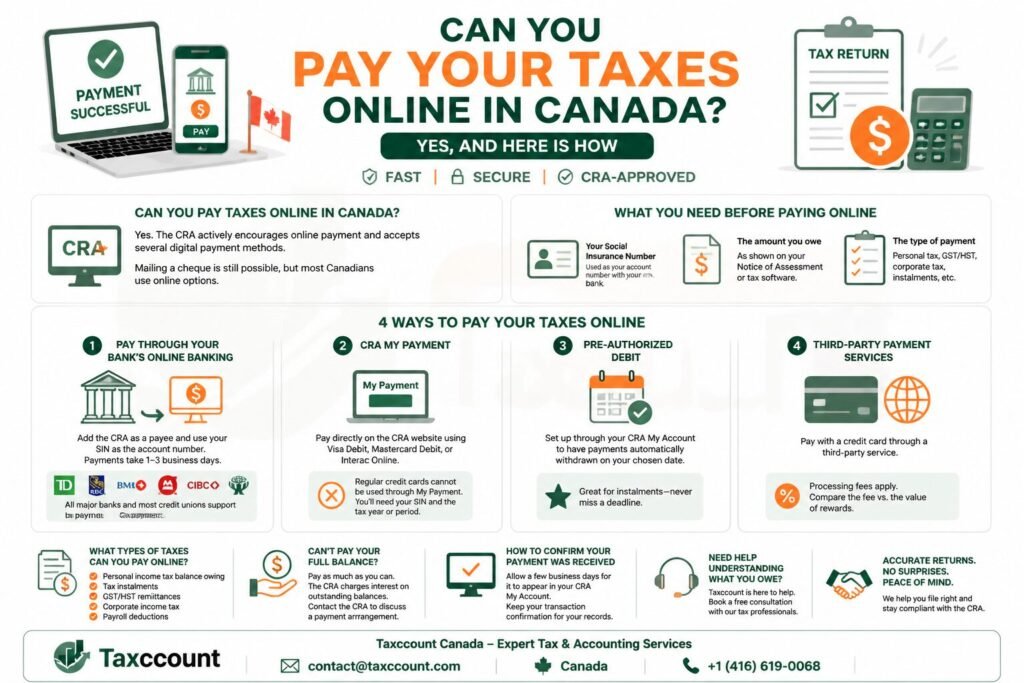
Yes. The Canada Revenue Agency actively encourages online payment and accepts several digital payment methods. The days of mailing a cheque to the CRA are largely behind most Canadians, though that option still exists.
Pay Taxes Online Easily
☎️ Get HelpWhat You Need Before Paying Online
Before making an online tax payment, have the following ready:
- Your Social Insurance Number, which is used as your account number when paying through your bank
- The amount you owe, as shown on your Notice of Assessment or tax software
- The type of payment you are making, such as personal income tax, HST/GST, or corporate tax
Method 1: Pay Through Your Bank’s Online Banking
This is the most popular method. Log in to your bank’s online portal and add the CRA as a payee. Search for a payee like CRA (revenue) personal income tax or a similar name depending on your bank. Use your Social Insurance Number as the account number. Once set up, you can make payments directly from your chequing or savings account. Payments are typically processed within one to three business days.
All major Canadian banks, including TD, RBC, BMO, Scotiabank, CIBC, and most credit unions, support CRA payments through online banking.
Method 2: CRA My Payment
The CRA offers its own online payment tool called My Payment, available on the CRA website. You can use it with a Visa Debit card, Mastercard Debit card, or Interac Online. You will need your Social Insurance Number and the tax year or period you are paying for. Note that regular credit cards cannot be used directly through My Payment.
Method 3: Pre-Authorized Debit
Through your CRA My Account, you can set up pre-authorized debit to have payments automatically withdrawn from your bank account on a date you choose. This is particularly useful for instalment payments throughout the year, so you never miss a deadline.
Method 4: Third-Party Payment Services
Some third-party services allow you to pay the CRA using a credit card, though a processing fee typically applies. This can be useful if you want to earn credit card rewards on your tax payment, but be sure to compare the fee against the value of your rewards before choosing this route.
What Types of Taxes Can You Pay Online?
You can pay most types of CRA obligations online, including:
- Personal income tax balance owing
- Tax instalments
- GST/HST remittances
- Corporate income tax
- Payroll deductions
What If You Cannot Pay Your Full Balance?
If you cannot pay your full tax balance by the deadline, pay as much as you can. The CRA charges interest on outstanding balances, so reducing the amount outstanding will reduce interest charges. You can also contact the CRA to discuss a payment arrangement.
How to Confirm Your Payment Was Received
After making a payment, allow a few business days for it to appear in your CRA My Account. If you paid through your bank, keep a record of the transaction confirmation. Payments do not always appear immediately, so plan to pay a few days before the deadline to avoid any late-payment issues.
Need Help Understanding What You Owe?
Taxccount helps individuals and businesses understand their CRA obligations, file accurate returns, and avoid penalties. If you are unsure what you owe or how to pay, our Canadian tax professionals are here to help. Book a free consultation with Taxccount today.
Table of Summary
Here is the blog information in 6 easy rows for quick understanding:
| Section | Easy Information |
|---|---|
| 1. Topic | The blog explains how Canadians can pay their taxes online safely and conveniently. |
| 2. Payment Requirement | CRA encourages online payment for personal, business, and instalment taxes, though cheques are still accepted. |
| 3. What You Need | SIN, the amount owing (from Notice of Assessment or tax software), and the type of tax payment (personal, GST/HST, corporate, payroll). |
| 4. Payment Methods | 1) Bank online banking (all major banks), 2) CRA My Payment (Visa Debit, Mastercard Debit, Interac Online), 3) Pre-authorized debit, 4) Third-party credit card services (fees may apply). |
| 5. Types of Taxes | Personal income tax, tax instalments, GST/HST remittances, corporate income tax, payroll deductions. |
| 6. If You Cannot Pay | Pay as much as possible, contact CRA for payment arrangements, and confirm payment appears in CRA My Account. |
Frequently Asked Questions
Can I use a credit card to pay the CRA?
Not directly through the CRA’s own payment systems. However, some third-party services allow you to use a credit card to pay the CRA for a fee. The CRA’s own My Payment tool only accepts debit cards and Interac Online.
How long does it take for a CRA payment to process?
Online banking payments to the CRA typically take one to three business days. CRA My Payment is usually processed more quickly. Always pay a few days before your deadline to account for processing time.
Is it safe to pay taxes online in Canada?
Yes. Paying through your bank’s secure online portal or through the CRA’s official website is safe. Always ensure you are on the official CRA website at canada.ca and never share your banking information over email or phone.
Take Control of Your Canadian Taxes Today
Paying your taxes online is simple once you know the options. If you need help calculating what you owe, filing your return, or setting up a payment plan with the CRA, Taxccount’s Canadian tax professionals are ready to assist. Book a free consultation with Taxccount today.
Manage CRA Payments Securely
☎️ Get HelpThis is general information only and not professional advice. Consult a professional before acting.
 Written and fact-checked by Udit Gupta
 Written and fact-checked by
 Ex Big4, Ernst & Young, Deloitte | International & Cross-Border Tax Specialist | CPA Canada In Depth Tax Training | Licensed Chartered Accountant from ICAI & MIA
Udit Gupta has over 15 years of experience helping corporations & business owners with corporate structuring, corporate tax filing, bookkeeping, payroll, GST/HST, cross-border tax and CRA representation. Big 4 trained at Ernst & Young and Deloitte, and qualified as a Chartered Accountant in India and Malaysia, he founded accounting firm in 2014 to serve entrepreneurs, startups and non-resident business owners across Canada. View Full Member Bio.
Indian Institute of Chartered Accountant Member No. (521458) | Malaysian Institute of Accountants Membership number (CA 44667) | Ex Big4,Ex Ernst & Young (EY), Ex-Deloitte | CPA Canada In-Depth Tax Training 19 Dec 2023, 12 Jul 2022, 5 Jul 2023
Editorial policy. Every article is researched against primary sources — the Income Tax Act, CRA publications and CPA Canada.