How to File a Tax Return in Canada: A Step-by-Step Guide
Filing a tax return can feel overwhelming if you have never done it before — or if your situation has changed from previous years. Between gathering documents, understanding deductions, and choosing how to file, it is easy to feel unsure about where to start.
This guide walks you through every step of filing a tax return in Canada, from gathering your documents to submitting your return and receiving your Notice of Assessment.
What Is a Tax Return?
A tax return is a document you submit to the Canada Revenue Agency (CRA) each year that reports all your income, deductions, and credits for that tax year. The CRA uses your return to calculate whether you owe more taxes or are entitled to a refund based on what was already withheld or paid during the year.
File Taxes With Confidence
☎️ Get HelpWho Needs to File?
You are required to file a return if:
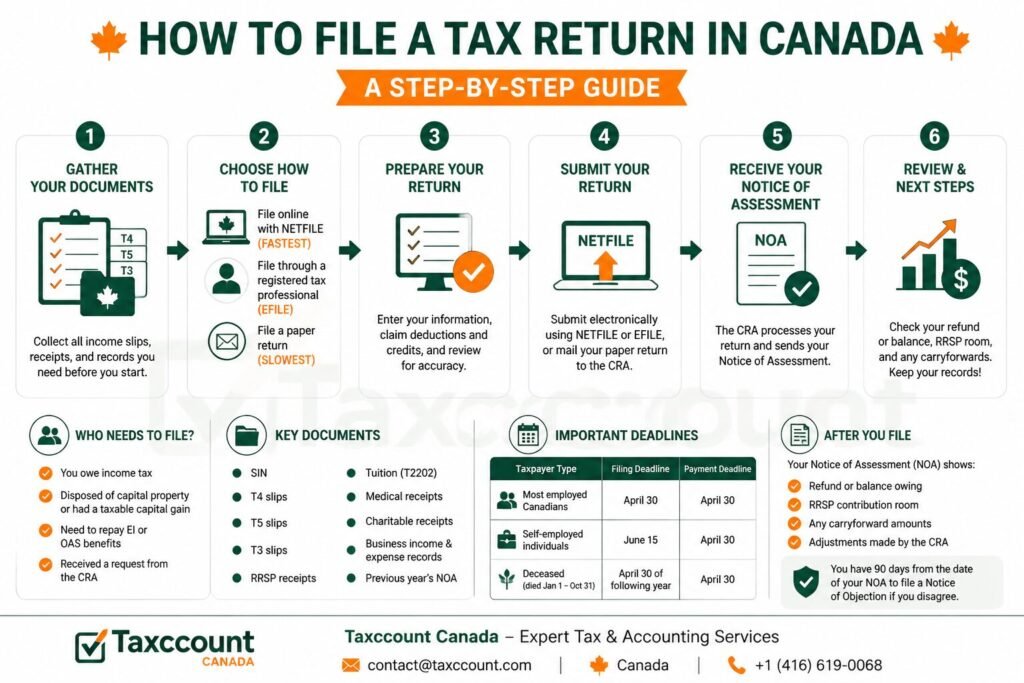
- You owe income tax to the CRA
- You disposed of capital property or had a taxable capital gain
- You have to repay EI or OAS benefits
- The CRA sent you a request to file
Even if you are not required to file, it is almost always a good idea because filing allows you to receive a tax refund, qualify for government benefits like the GST/HST Credit and Canada Child Benefit, build RRSP contribution room, and carry forward unused credits and losses.
What Documents Do You Need?
Gather the following before you start:
- Social Insurance Number (SIN)
- T4 slips — From each employer showing employment income and deductions
- T5 slips — For investment income such as dividends and interest
- T3 slips — For income from trusts or mutual funds
- RRSP contribution receipts
- Tuition receipts (T2202) — If you attended a qualifying post-secondary institution
- Medical expense receipts
- Charitable donation receipts
- Business income and expense records — If you are self-employed
- Previous year’s Notice of Assessment — To confirm your RRSP room and any carryforward amounts
Ways to File Your Tax Return
There are three main ways to file your Canadian tax return:
- Online using NETFILE-certified software — The most common and fastest method
- Through a registered tax professional — Best for complex situations
- By mailing a paper return — The slowest option, only recommended when electronic filing is not available
How to File Online Using NETFILE
NETFILE is the CRA’s electronic filing system. You use CRA-certified tax software to prepare your return and then submit it directly to the CRA electronically. Here is how:
- Choose CRA-certified tax software (many options are available for free for simple returns)
- Enter your personal information, income slips, and deductions into the software
- Review your return for accuracy
- Submit the return through the software using NETFILE
- Receive a confirmation number immediately after submission
NETFILE returns are typically processed within two weeks, and refunds are issued quickly — especially if you are registered for direct deposit.
How to File Through a Tax Professional
A registered tax professional can prepare and file your return using the EFILE service. This option is ideal if:
- You have complex income (self-employment, rental income, investments, foreign income)
- You want to ensure you are claiming every eligible deduction and credit
- You are filing for multiple years
- You received a letter from the CRA or are being audited
A tax professional also represents you if the CRA questions your return, giving you peace of mind and expert support.
How to File a Paper Return
If you prefer to file on paper, you can download the T1 General form and accompanying schedules from the CRA website or pick up paper forms at a Canada Post outlet or Service Canada location.
Complete all required sections, attach any required slips and receipts, and mail the package to your regional CRA tax centre. Paper returns take significantly longer to process than electronic filings.
Deadlines to Know
| Taxpayer Type | Filing Deadline | Payment Deadline |
|---|---|---|
| Most employed Canadians | April 30 | April 30 |
| Self-employed individuals | June 15 | April 30 |
| Deceased (died Jan 1 – Oct 31) | April 30 of following year | April 30 |
After You File: What to Expect
After the CRA processes your return, you will receive a Notice of Assessment (NOA). This document confirms:
- Whether you owe a balance or are receiving a refund
- Your RRSP contribution room for the next year
- Any carryforward amounts (capital losses, tuition credits, etc.)
- Whether the CRA has made any adjustments to your return
Review your NOA carefully. If you disagree with the assessment, you have 90 days from the date of the NOA to file a Notice of Objection.
Let Taxccount File Your Return for You — Accurately and On Time
Taxccount helps individuals, families, self-employed Canadians, and corporations file accurate, complete tax returns every year. We ensure you claim everything you are entitled to and stay fully compliant with CRA requirements. Book a free consultation with Taxccount today.
Table of Summary
Here is the blog information in 6 easy rows for your reference:
| Section | Easy Information |
|---|---|
| 1. Topic | The blog explains how to file a tax return in Canada, step by step, including documents, deadlines, and methods. |
| 2. What Is a Tax Return | A tax return reports all income, deductions, and credits to the CRA to calculate your balance owing or refund. |
| 3. Who Must File | You must file if you owe tax, disposed of capital property, must repay EI/OAS, or received a CRA request. Filing is recommended even if not required. |
| 4. Documents Needed | SIN, T4/T5/T3 slips, RRSP receipts, tuition (T2202), medical receipts, charitable donations, business income/expense records, prior-year NOA. |
| 5. Filing Methods | File online via NETFILE, through a registered tax professional (EFILE), or a paper return. Online is fastest; paper is slowest. |
| 6. Simple Summary | Gather all documents, choose your filing method, submit by deadlines (April 30 for most, June 15 if self-employed), and review your Notice of Assessment. |
Frequently Asked Questions
How long does it take to get a tax refund in Canada?
If you file electronically and are registered for direct deposit, refunds are typically issued within two weeks. Paper returns can take 8 weeks or longer. You can track your refund status through CRA My Account.
Can I file my taxes for free in Canada?
Yes. Several NETFILE-certified software programs are free for simple returns. The CRA also offers the Community Volunteer Income Tax Program (CVITP), which provides free tax preparation for eligible Canadians with modest incomes and straightforward tax situations.
What happens if I make a mistake on my tax return?
You can correct a filed return by submitting a T1 Adjustment Request (T1-ADJ) through CRA My Account or by mailing a request to the CRA. Do not file a completely new return to correct a mistake — use the adjustment process instead.
Can I file taxes for previous years?
Yes. You can file returns for up to ten previous years. If you are owed refunds for those years, you must file within ten years to claim them. If you owe money for past years, file as soon as possible to reduce the interest and penalties accumulating on your balance.
Get Expert Tax Help
☎️ Get HelpOfficial CRA Source
- How to get Canada Carbon Rebate payments – CRA
- Payment timing – CRA
- Canada Carbon Rebate payment amounts – CRA
- Small and rural communities supplement – CRA
- Canada Carbon Rebate for Small Businesses – CRA
- Who is eligible for Canada Carbon Rebate for Small Businesses – CRA
- Tax treatment of Canada Carbon Rebate for Small Businesses – CRA
- Canada Carbon Rebate for individuals – CRA
This is general information only and not professional advice. Consult a professional before acting.
 Written and fact-checked by Udit Gupta
 Written and fact-checked by
 Ex Big4, Ernst & Young, Deloitte | International & Cross-Border Tax Specialist | CPA Canada In Depth Tax Training | Licensed Chartered Accountant from ICAI & MIA
Udit Gupta has over 15 years of experience helping corporations & business owners with corporate structuring, corporate tax filing, bookkeeping, payroll, GST/HST, cross-border tax and CRA representation. Big 4 trained at Ernst & Young and Deloitte, and qualified as a Chartered Accountant in India and Malaysia, he founded accounting firm in 2014 to serve entrepreneurs, startups and non-resident business owners across Canada. View Full Member Bio.
Indian Institute of Chartered Accountant Member No. (521458) | Malaysian Institute of Accountants Membership number (CA 44667) | Ex Big4,Ex Ernst & Young (EY), Ex-Deloitte | CPA Canada In-Depth Tax Training 19 Dec 2023, 12 Jul 2022, 5 Jul 2023
Editorial policy. Every article is researched against primary sources — the Income Tax Act, CRA publications and CPA Canada.